
How to Start Using AI in Your Business: A Step-by-Step Roadmap for Small Business (2026)
by Sandlabs Team, Founder, Sandlabs
You've downloaded Claude. You use it now and then — to rewrite an awkward email, summarise a long document, or think through a decision. Your team has it open too, mostly as a smarter Google. And you have a nagging feeling you should be getting more out of it. You're just not sure what "more" looks like, or how to get there without it becoming a six-month project.
If that's you, you're not behind. You're exactly where most businesses are. The question isn't whether to use AI — you already are. The question is how to move from using it occasionally to running your business on it, deliberately, without wasting money or breaking anything.
This is the step-by-step roadmap we walk clients through. No hype, no 40-slide "AI strategy" deck. Just the path from where you are now to a workflow that pays for itself.
First, what does "using AI in your business" actually mean? It's simpler than the hype suggests. Using AI in your business means putting tools like Claude or ChatGPT to work on real, everyday tasks — drafting and editing, summarising documents, analysing data, answering customers, and automating repetitive admin — so your team spends less time on busywork and more on the work that grows the business. You don't need data scientists or a big budget to start. You need a plan — and that plan is the same whether your business is in Australia, New Zealand or the US.
The uncomfortable truth: using AI isn't the same as getting value from it
Here's the data that should reframe how you think about this.
According to Deloitte Australia's November 2025 report The AI edge for small business, two-thirds of Australian SMBs now use AI in some form — but only about 5% use it in a genuinely embedded, "fully enabled" way. And one in three businesses that haven't started say the reason is simply that they don't know where to start.
It gets sharper. An MIT study widely reported through 2025 found that roughly 95% of corporate generative-AI pilots delivered no measurable return. Not because the models were bad — because the organisations never built a system around them. Tools like Claude and ChatGPT are brilliant for individuals precisely because they're flexible, but that same flexibility means they quietly stall inside a business that hasn't decided what to use them for.
So there are really two gaps, and almost everyone is stuck in one of them:
- The starting gap — you know AI matters but don't know the first concrete step.
- The value gap — you're "using AI" but it isn't actually saving hours or making money yet.
The businesses pulling ahead aren't using better AI than you. They're the same Claude, the same ChatGPT. They're just using it more deliberately — and that's a thing you can copy.
Top tip
If your team uses AI like a search engine, you're getting maybe 5% of the value. The leap isn't a better tool — it's turning ad-hoc use into repeatable workflows. That's what the rest of this guide is about.
Step 0: Find yourself on the AI maturity ladder
Before you do anything, work out which rung you're standing on. Almost every business climbs the same four-rung ladder — and the goal is never to leap to the top. It's to climb one rung this quarter.
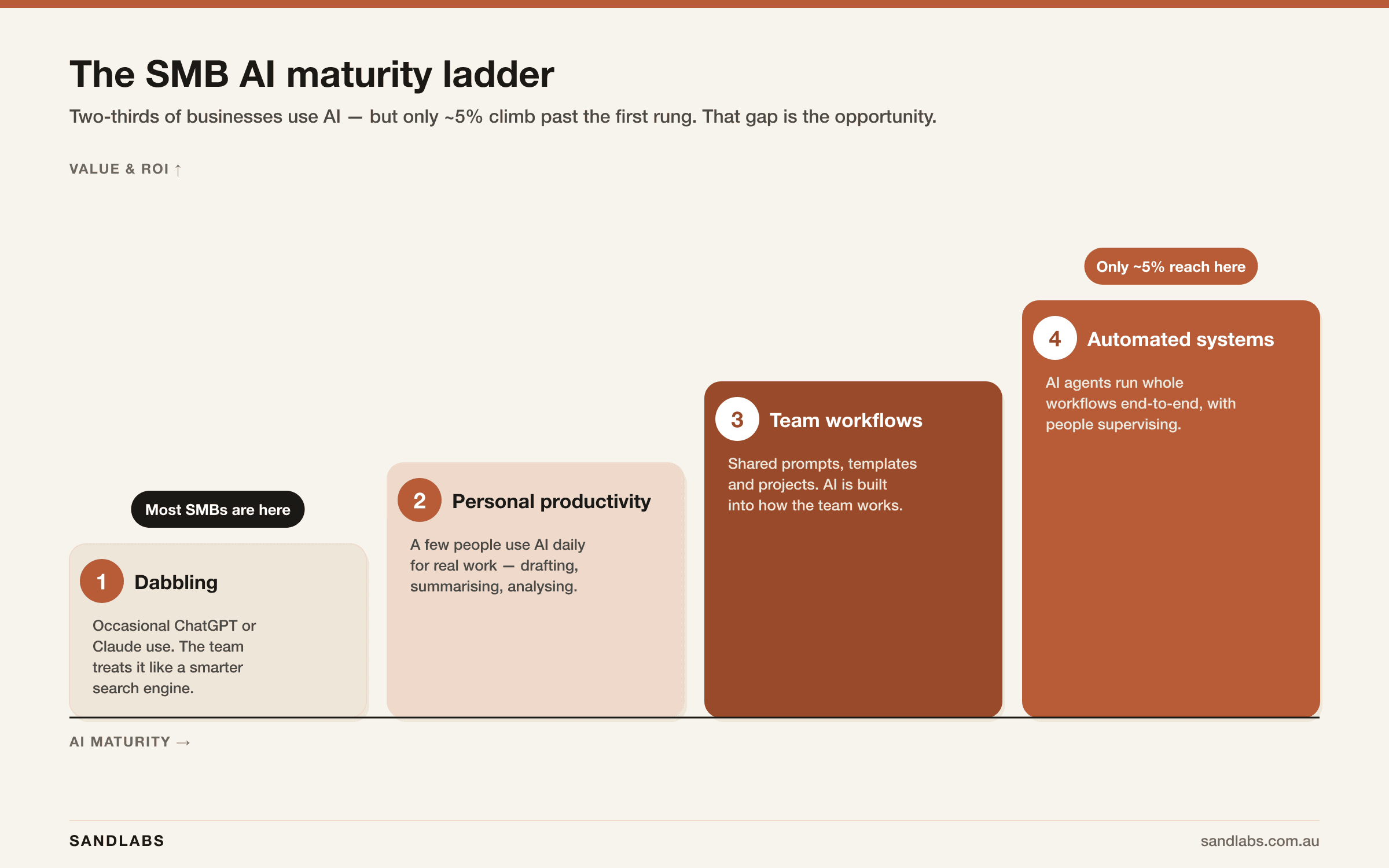
- Dabbling — occasional Claude or ChatGPT use; the team treats it like a smarter search engine. (This is where ~two-thirds of businesses sit.)
- Personal productivity — a handful of people use AI daily for real work: drafting, summarising, analysing, planning.
- Team workflows — shared prompts, templates and projects. AI is built into how the team works, not just what individuals do.
- Automated systems — AI agents run whole workflows end-to-end, with people supervising rather than doing.
Why climb at all? Because the returns compound. Deloitte's modelling found that an SMB moving from basic to intermediate AI use saw roughly a 45% increase in profitability, and moving from intermediate to fully enabled saw a 111% increase. They also estimate that if just one in ten Australian SMBs climbed a single rung, it would add $44 billion a year to the economy.
You don't need to be on rung four. You need to stop standing still on rung one. Here's exactly how.
What can AI actually do for a small business? 9 examples by function
"Using AI" stays abstract until you map it to the work you already do. Here's what it looks like in practice across a typical small business — and none of this needs a developer or a custom build:
- Admin & operations — turn messy notes into clean SOPs and process docs, draft and format documents, and build the spreadsheet formula you can never remember.
- Email & inbox — triage and summarise long threads and draft replies in your own tone, so a 40-email backlog becomes 20 minutes.
- Meetings — transcribe calls, summarise decisions and pull out action items automatically, so nothing slips.
- Marketing & content — first-draft blog posts, social captions and email campaigns, and turn one article into ten pieces of content.
- Sales — research prospects, personalise outreach and draft proposals in minutes instead of hours.
- Customer service — draft support replies, summarise tickets and answer FAQs so customers get faster, more consistent responses.
- Finance & bookkeeping — categorise transactions, extract data from invoices and turn numbers into plain-English summaries.
- HR & recruitment — draft job ads, screen and shortlist resumes, and build onboarding material.
- Research & analysis — summarise long contracts and reports, and run quick competitive research before a meeting.
The pattern is the same everywhere: AI is brilliant at the repetitive, language-heavy slice of a job — roughly the first 30% — which frees your people for the 70% that needs judgement, relationships and context. (More on that "30% rule" in the FAQ.) Find the row that matches your biggest time-sink. That's your starting point.
How to start using AI in your business: a 7-step roadmap
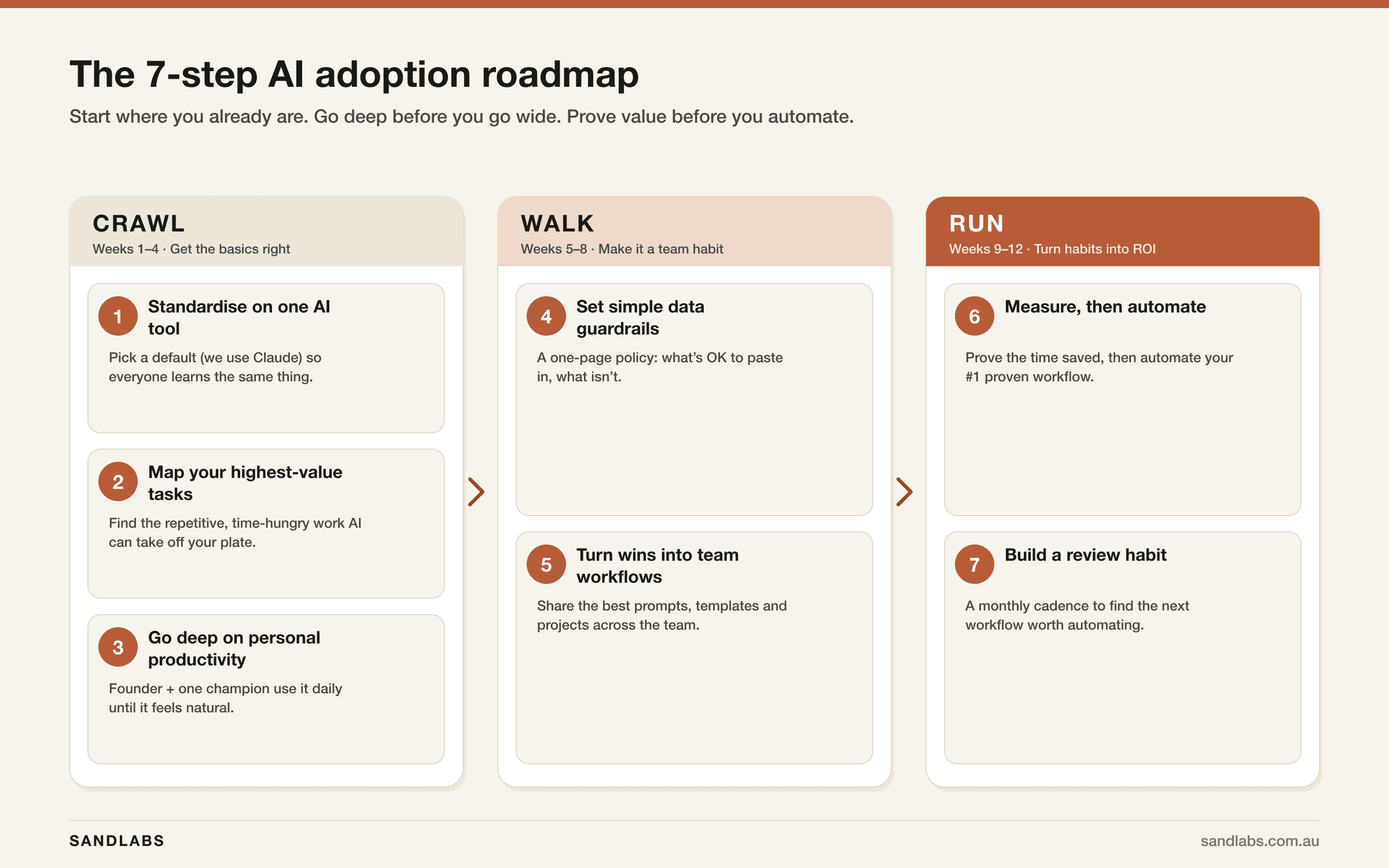
The whole roadmap fits on one page. We group it into three phases — Crawl, Walk, Run — because the order matters more than the speed. Skip ahead and you end up in the 95% that never see a return.
Step 1 — Standardise on one AI tool
The single most common mistake is letting everyone use a different tool, badly. One person's on ChatGPT, another's pasting into Gemini, a third signed up for some AI app they saw on LinkedIn. Nobody gets good, nothing is shareable, and no one can help anyone else.
Pick one and go deep. When everyone uses the same tool, learning compounds — a great prompt one person writes becomes a template the whole team uses.
We standardise clients on Claude, for three reasons that matter to a business specifically:
- Privacy posture. On Claude's Team and Enterprise plans, your conversations aren't used to train the models. For a business pasting in real client data, that's non-negotiable.
- Quality on business work. Claude is particularly strong at the things SMBs actually do all day — writing, editing, reasoning over documents, and structured analysis.
- It grows with you. The same tool you use for personal drafting today supports Projects, Skills and connected data sources tomorrow — so rung one and rung three are the same platform.
New to it? Start with what Claude AI actually is and our breakdown of Claude vs ChatGPT for business. If you want the team-rollout view, Claude for Business covers it.
This week: pick your standard tool. Put everyone on the same paid plan. Done.
Step 2 — Map your highest-value tasks
Don't try to "do AI" everywhere. Find the handful of tasks where it pays off fastest, and start there.
Run a simple time audit: for one week, have yourself and your team note the work that is repetitive, language-heavy, and low-stakes to get wrong on the first pass. That intersection — boring, wordy, and forgiving — is where AI delivers immediate wins with almost no risk.
Then plot every idea on this matrix. Impact on one axis, effort on the other. Begin in the top-left.
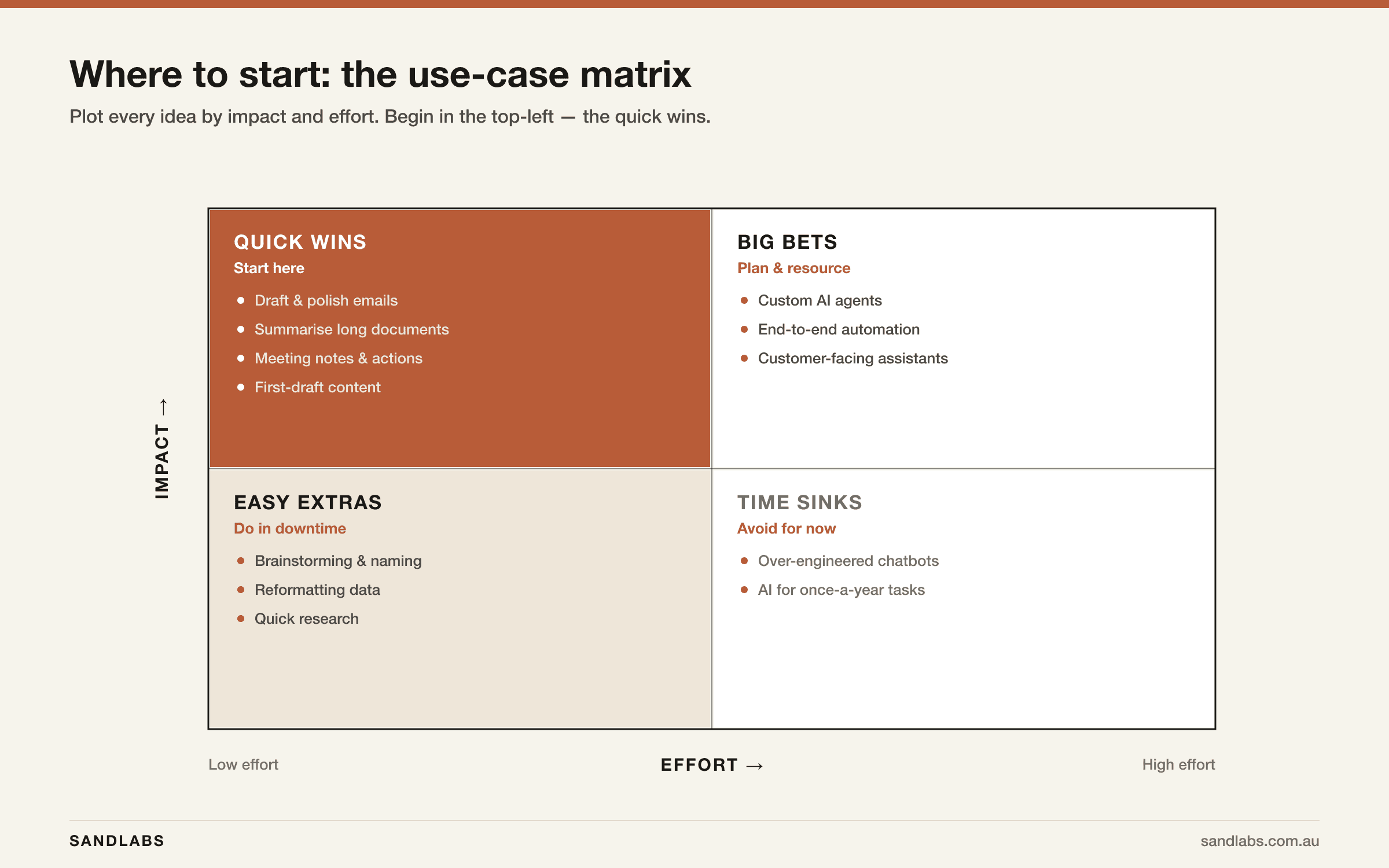
The quick wins — drafting and polishing emails, summarising long documents, turning meeting notes into actions, first-draft content — need no developers, no budget, and no risk. They're how you build belief in the team. The big bets (custom agents, end-to-end automation) are real, but they come after you've proven value, not before.
For a sense of what's possible by function, browse AI use cases for business and AI automation for small business.
This week: list your top five quick-win tasks. Pick the one you do most often to start.
Step 3 — Go deep on personal productivity first
Here's the counterintuitive part: don't roll AI out to the whole team yet. Depth beats breadth. A business where two people are genuinely excellent with AI will outrun one where twenty people are mediocre at it.
Pick two people to go deep: you (the founder) and one "AI champion" — whoever on the team is naturally curious about it. For 2–4 weeks, the two of you use the tool daily on the quick-win tasks from Step 2 until it feels as natural as email.
What "going deep" actually means:
- Stop writing one-line prompts. Give context, examples, and the format you want back.
- Save your best prompts. The fourth time you ask for something, you should be pasting a refined prompt, not reinventing it.
- Push past the first answer. The magic is usually in the follow-up: "good, now make it shorter and less formal."
A couple of hours with our Claude prompting guide will move you further than any amount of passive dabbling.
This week: you and your champion commit to using AI on one real task every single day.
Step 4 — Set simple guardrails before you roll out
This is the step everyone skips, and it's why staff quietly won't use AI on anything that matters. In Australia, the number-one barrier to adoption isn't cost or skills — it's trust. Around 65% of non-adopters cite distrust or a preference to keep humans in control, and 39% specifically name privacy and security.
You fix that with one page, not a policy binder. Your one-page AI policy answers three questions:
- What data is OK to put in, and what isn't? (e.g. fine: draft marketing copy, public info, de-identified examples. Not fine: customer PII, contracts, anything you wouldn't email externally — unless you're on a plan that contractually protects it.)
- Which plan are we on, and does it train on our data? Team and Enterprise plans keep your data out of training; free consumer tools may not. This one fact changes what staff are allowed to paste in.
- What always needs a human check? Anything client-facing, financial, or legal gets reviewed before it goes out. AI drafts; a person signs off.
If data residency or compliance is a concern — common in financial services, health and professional services — our guide to Claude Team vs Enterprise and data residency covers where your data lives and who can see it. For the risk view on automated systems later, see AI agent security risks.
This week: write the one-page policy. Share it. Now people will actually use AI on real work.
Step 5 — Turn personal wins into team workflows
Now — and only now — you go wide. The two people who got good in Step 3 turn their individual wins into things the whole team can use.
- A shared prompt library. The best prompts become team templates. "Use this to draft a client update; this to summarise a call."
- Projects and templates. Set up shared Projects in Claude with your context, tone of voice, and reference docs baked in, so every output already sounds like your business.
- Skills for the repeatable stuff. Claude Skills let you package a repeatable task — a proposal format, a reporting structure — so anyone can run it perfectly without being a prompt expert.
If you want the connected-workspace version of this — Claude wired into your tools and data — Claude Cowork for business is the next rung, and we've written up a 30-day team rollout you can follow.
This month: document your three best workflows and put them somewhere the whole team can grab them.
Step 6 — Measure, then automate the winner
This is where dabbling turns into ROI — and where most of the real money is. The MIT research found the biggest returns weren't in flashy marketing tools; they were in back-office automation: the repetitive operational work that quietly eats your week.
So measure first. For the workflows from Step 5, track the boring number: hours saved per week. Once one workflow is clearly, repeatedly saving time, it's earned the right to be automated — turned from "a person prompting Claude" into "a system that runs itself" with a person supervising.
That's the jump from rung three to rung four: a custom AI agent that handles the whole workflow — reading the data, doing the task, flagging the exceptions. It's a build, but a de-risked one, because you already proved the workflow pays.
The cheapest way to scope that build is a discovery sprint; for what an automation actually costs, see our AI agent development cost breakdown and the broader guide to AI automation for business.
This quarter: pick your single most-proven workflow and get a fixed-price quote to automate it.
Step 7 — Build a review habit
AI adoption isn't a project with an end date; it's a capability you keep compounding. The businesses that win put a light rhythm around it:
- A monthly 30-minute review: what did AI save us this month? What's the next workflow worth tackling?
- Your AI champion keeps a running list of new use cases as the team spots them.
- Each quarter, you climb one more rung.
That's the whole secret. Not a big bang — a steady climb.
Your first 90 days
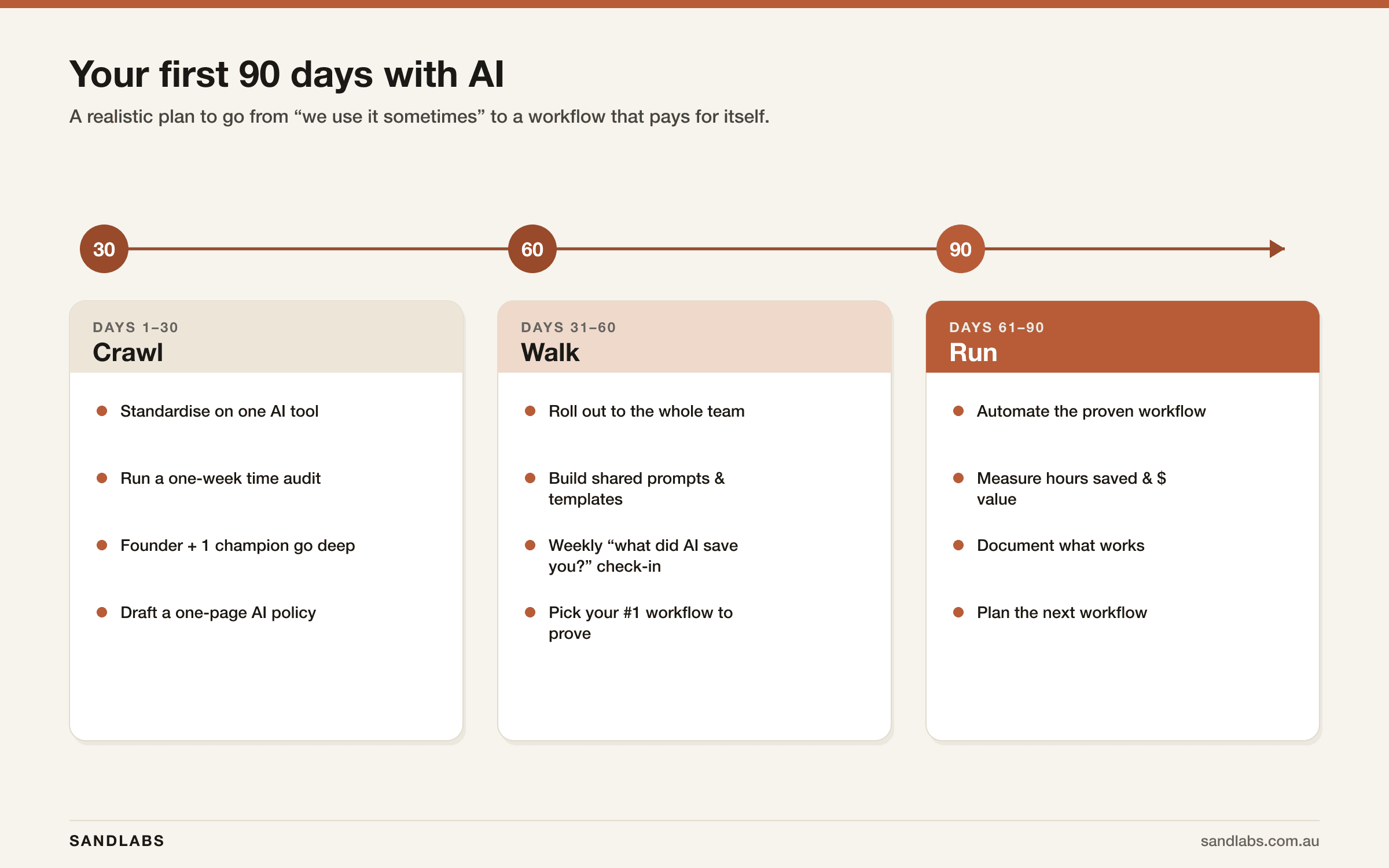
If you want this as a calendar rather than a concept, here's what the first three months look like in practice.
| Phase | Timeframe | The goal | What you do |
|---|---|---|---|
| Crawl | Days 1–30 | Get the basics right | Standardise on one tool · run a one-week time audit · founder + champion go deep · draft the one-page policy |
| Walk | Days 31–60 | Make it a team habit | Roll out to the team · build shared prompts & templates · weekly "what did AI save you?" check-in · pick your #1 workflow to prove |
| Run | Days 61–90 | Turn habits into ROI | Automate the proven workflow · measure hours and dollars saved · document what works · plan the next |
Ninety days from "we use it sometimes" to one workflow that genuinely pays for itself. That's a realistic, achievable target for any SMB.
The 5 mistakes that keep businesses stuck on rung one
Almost every stalled AI effort we see made at least one of these:
- Going wide before deep. Rolling AI out to twenty people before anyone is actually good at it. You get twenty mediocre users and zero champions. Go deep with two people first (Step 3).
- Spending in the wrong place. Pouring budget into shiny customer-facing or marketing AI when the real, boring ROI is in back-office operations. Follow the hours saved, not the hype.
- No guardrails. Without a clear policy, staff won't risk using AI on anything important — so it never touches the work that matters. One page fixes it (Step 4).
- Automating before proving. Commissioning a custom build for a workflow you haven't validated by hand. Prove it with a human first; then automate (Step 6).
- Tool-of-the-week syndrome. Chasing every new AI app instead of getting genuinely good at one. Depth compounds; novelty doesn't.
Frequently asked questions about AI for small business
- How do I start using AI in my business?
- Start small and deliberately. Pick one AI tool (we use Claude), then put two people — usually the founder and one keen "champion" — on it daily for your most repetitive, language-heavy tasks. Write a one-page policy on what data is safe to use, turn the best results into shared team workflows, and prove the hours saved on one workflow before you automate it. Our free step-by-step guide walks you through it.
- What can AI do for a small business?
- Across a small business, AI drafts and edits writing, summarises documents and meetings, triages email, answers customer questions, researches prospects, categorises transactions and builds reports. In short, it takes on the repetitive, language-heavy work in admin, marketing, sales, finance, customer service and HR — see the nine examples by function above.
- What are the best AI tools for a small business?
- For most small businesses, a single general assistant delivers about 80% of the value — we use Claude for writing, analysis and document work. Add a meeting notetaker and a workflow connector (like Zapier or Make) as you grow. Resist collecting ten tools; get genuinely good at one first. See our Claude vs ChatGPT for business comparison.
- How much does it cost to start using AI in a small business?
- Very little to begin. Claude Pro is about US$20 (around A$30) per user per month, and a Team plan — which keeps your data out of model training — is roughly US$25–30 (A$40–50) per user per month. Most small businesses get real value from subscriptions alone, long before spending anything on custom automation. See our Claude pricing guide for the full breakdown.
- Is it safe to use AI with business data?
- Yes, with basic guardrails. Use a business plan (Claude Team or Enterprise) where your data is not used to train the models, write a one-page policy on what staff can and cannot paste in, and keep a human reviewing anything client-facing, financial or legal. That covers the privacy and trust concerns that stop most teams from using AI on real work.
- What is the 30% rule for AI?
- It is a rule of thumb that AI can reliably handle about 30% of the tasks in most roles — the repetitive, rule-based, language-heavy work — while the other 70% still needs human judgement, creativity and context. For a small business it is a useful reminder: point AI at that repetitive third, and keep your people on the decisions that genuinely need them.
- What are the disadvantages of using AI in business?
- The real risks are using AI without guardrails (data leaks), trusting outputs blindly (AI can be confidently wrong, so it needs a human check), and paying for tools you never actually embed. You avoid all three by setting a simple data policy, keeping a human in the loop on important work, and proving value on one workflow before you scale. The five mistakes above cover the rest.
Where to go from here
You don't need an AI strategy. You need to climb one rung. If your team is on rung one today, the entire job for this quarter is: pick Claude, get two people genuinely good at it, write one page of rules, and prove one workflow.
If you'd rather not figure it out alone, that's exactly what we do:
- Grab the free PDF guide. Our free step-by-step Claude setup guide (PDF) walks your team through getting started — no cost, no call required.
- Have it set up for you. Our Claude Done-For-You Setup gets your team configured, connected to your tools, and trained in about a week, so you skip straight to rung three.
- Talk it through. Tell us about your workflow and we'll look at your actual workflows and tell you honestly where AI will — and won't — pay off.
The gap between dabbling and ROI isn't a better model. It's a system. Now you have one.
Sources: Deloitte Australia, "The AI edge for small business" (November 2025); MIT NANDA, "The GenAI Divide: State of AI in Business 2025"; Australia's National AI Centre AI adoption tracking (2024–2026). Figures current as of June 2026.