
Work Order Management & Production Scheduling: Controlling What Happens Next
by Sandlabs Team, Founder, Sandlabs
If job and production tracking tells you where every job is, work-order management and production scheduling decide what happens next. One is visibility; the other is control. A production system needs both — and most spreadsheet setups have neither in a reliable form.
Here is what the control layer actually covers, when it is worth automating, and how it fits the rest of your floor.
Work orders: the unit of control
A work order is the instruction to make something — the job, its details, its deadline, and the steps it has to pass through. Work-order management is how those instructions are created, released, sequenced and closed out, so the floor always knows what it is working on and what comes after.
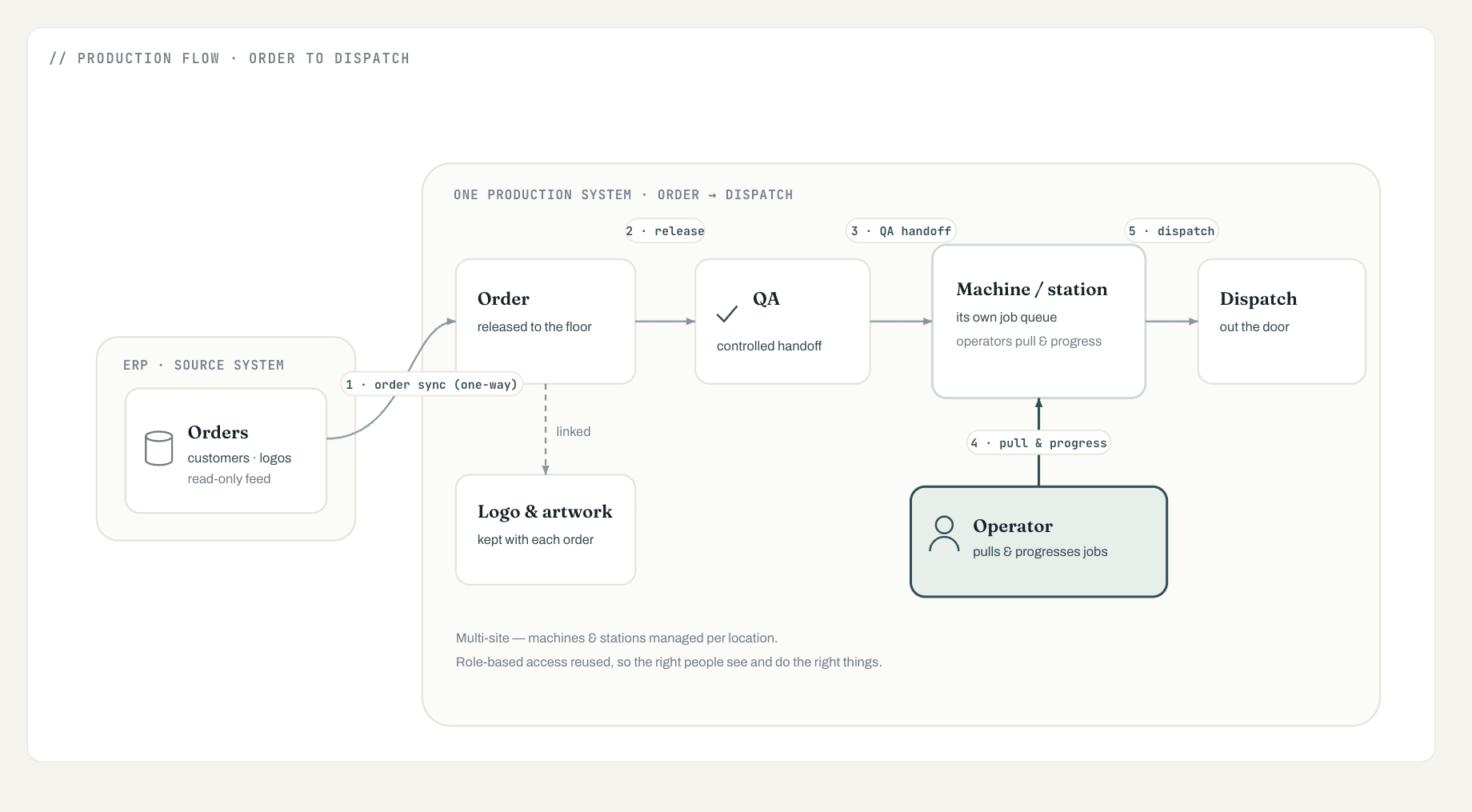
In a purpose-built system, the work order moves through the same flow as everything else — order → QA → station → dispatch — but with control built in: a job can't jump its QA gate, a station only sees what is ready for it, and closing one step releases the next.
What good work-order management does
The bar is not "a digital list of jobs." Good work-order management:
- Releases work in a controlled way — nothing hits a station before it is ready, so QA isn't bypassed under pressure.
- Gives each station its own queue — operators pull and progress their own jobs instead of being handed paper.
- Keeps the full picture — every work order, its status and its history, in one place rather than across tools and memory.
- Closes the loop — finishing a step advances the job, so the next station's queue updates itself.
That controlled handoff is the difference between a floor that flows and one where work piles up invisibly at a bottleneck. We built exactly this for an Australian decoration and apparel manufacturer — the full flow is in From Spreadsheets to One Production System.
Production scheduling: manual vs automated
Scheduling is the harder, more valuable cousin of work-order management — deciding the sequence and timing of work across machines and people. There are two honest levels of it, and you do not need to jump straight to the top.
| Manual / assisted scheduling | Automated capacity scheduling | |
|---|---|---|
| How it works | People sequence work; the system makes the queue and constraints visible | The system proposes a schedule from capacity, due dates and machine fit |
| Best for | Most small and growing manufacturers | Complex, high-volume, multi-machine operations |
| Effort to deliver | Part of a first system | A substantial, later body of work |
| Risk | Low — keeps human judgement in the loop | Higher — needs clean data and proven basics first |
The mistake is buying automated scheduling before the floor is even tracking jobs reliably. Automated capacity scheduling is genuinely powerful, but it is a follow-on — it works only once your work orders, statuses and stations are trustworthy. Start with assisted scheduling on a system that makes constraints visible, and automate when the data underneath it has earned that trust.
The order-to-dispatch control loop
Put visibility and control together and you get a loop: every order is tracked live, work-order management decides what each station does next, and the handoffs between stages keep work moving without stalls. Orders flow in from your existing systems, operators progress them on screen, and completed work moves to dispatch — every order visible end to end.
That loop is the whole point of a production system. The tracking half is covered in job and production tracking; if you are still deciding what category of software you need, start with Production System vs MES vs ERP.
Where to start
You don't need automated scheduling on day one — you need controlled work-order release, station queues, and clean handoffs. Get that working and trusted first; the heavier scheduling automation is a deliberate next phase, not a prerequisite.
We build production systems with the control layer built in — work orders that release cleanly and a floor that always knows what's next. A short scoping call shows what order-to-dispatch control would look like for you — explore our AI & software consulting or get in touch.