
From Spreadsheets to One Production System: A Decoration & Apparel Manufacturing Case Study
by Sandlabs Team, Founder, Sandlabs
A well-established Australian decoration and apparel manufacturer — embroidery, print and finishing at scale — came to us wanting to replace a patchwork of production tools with a single, purpose-built system. They needed complete visibility of every order as it moved from release through to dispatch, a clear view of work at each machine and station, and a clean way for operators to manage their day — all feeding from their existing ERP.
This is a case study in two parts: first, why the problem they had is far more common than it looks; and second, what one production system — covering order → QA → machine/operator station → dispatch — actually looks like when you build it properly.
The starting point: a patchwork that mostly works
The business was already running production through a mix of reporting dashboards, a separate quality-check screen, and manual status updates across multiple sites. It worked. But it was fragmented: hard to see an order end to end, easy for jobs to stall unnoticed, and dependent on people remembering where things were up to.
They had even sketched a working prototype themselves — proof the team knew exactly how they wanted to operate, just not a system that could survive daily use on the floor.
If that sounds familiar, it should.
This is the rule, not the exception
The spreadsheet-and-dashboard patchwork isn't a quirk of one business — it's the default manufacturing system for most of the industry:
- 54% of plants globally still run on spreadsheets or paper to manage manufacturing operations (IoT Analytics, 2024).
- A separate survey found 55% of automotive manufacturers still rely on spreadsheets for quality management (The Supply Chain Xchange).
- The category built to replace that patchwork — manufacturing execution systems — is a $16.5B+ global market in 2025, growing ~10–15% a year, with 300+ vendors competing in it (Grand View Research, Fortune Business Insights).
In other words: the pain is near-universal, and the appetite to fix it is large and well-funded.
Yet for a decoration and apparel manufacturer specifically, there's a catch. Generic manufacturing-execution platforms are overkill — and priced — for an enterprise; the lightweight tools built around embroidery and screen-printing are designed for artwork and digitising, not floor management. Between "too heavy" and "too light" sits a business with no off-the-shelf system that fits how decoration runs. That gap is exactly where a purpose-built system earns its keep.
What we built: one flow, order to dispatch
We scoped a single production application covering the full flow, fed by a one-way order sync from the client's existing ERP — so there's no double entry, and one live status follows every order from the moment it lands.
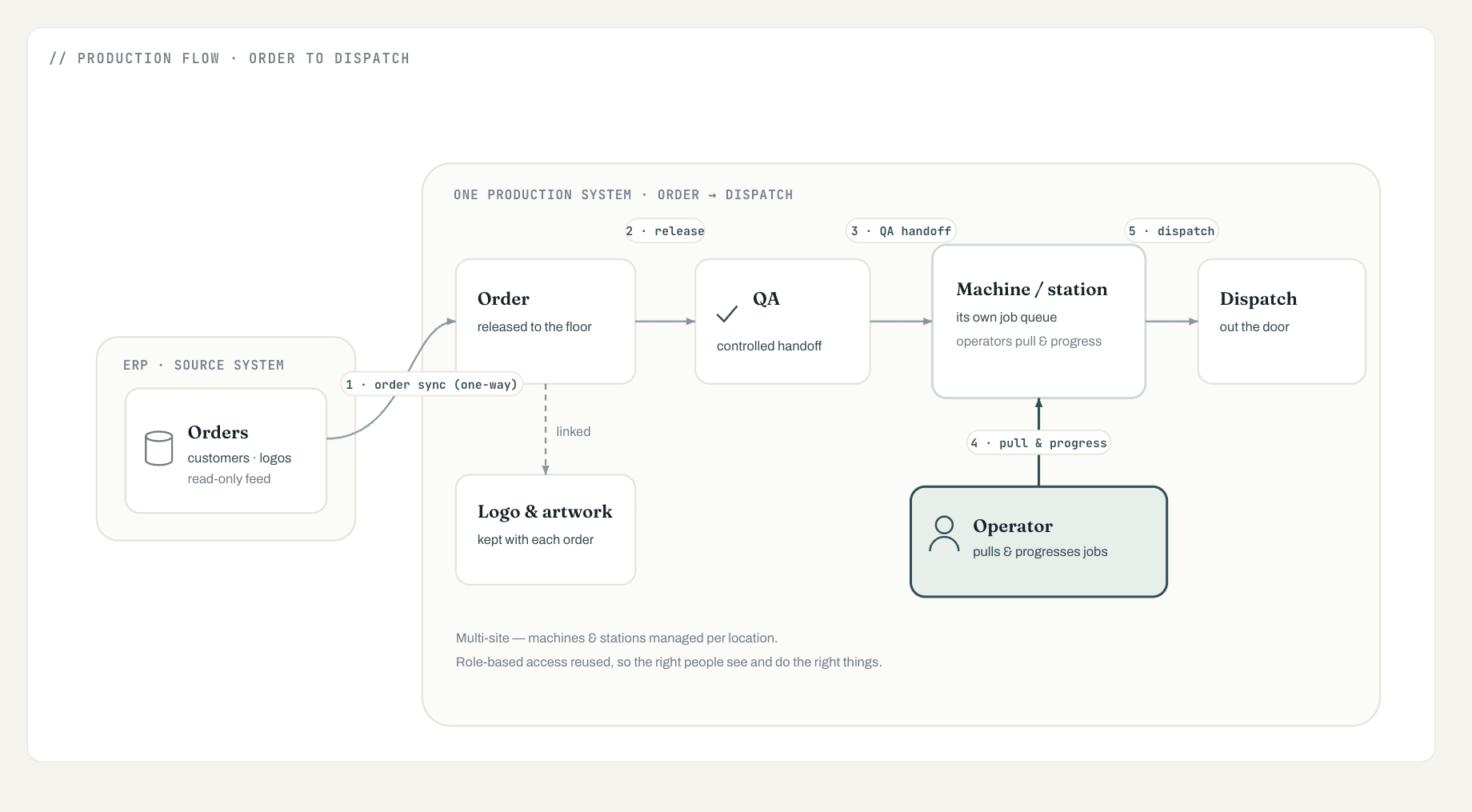
Reading the flow left to right:
- Orders sync in from the ERP — one-way and read-only, so there's no rekeying.
- The order is released to the floor with a single live status from that point on.
- A clean QA-to-production handoff moves work forward in a controlled, visible way.
- Operators pull and progress their own jobs. Each machine shows its own queue, so the floor works from the screen rather than chasing paper.
- Completed work moves to dispatch — every order visible from release to out-the-door.
Alongside the flow: logo and artwork records stay attached to each order, the system is multi-site by design with machines and stations managed per location, and role-based access is reused so the right people see and do the right things.
One deliberate boundary: the ERP sync is one-way. The system reads orders and never writes back. Shop-floor barcode scanning, direct embroidery-machine integration, automated capacity scheduling and two-way ERP sync are each substantial bodies of work — and we named them as later work rather than rushing them into the first build.
Scoped honestly: a complete first system, then the heavy pieces
The thing that de-risks a build like this is being honest about what's in the first system and what isn't — so expectations, timeline and cost stay predictable.
| In the first system (built now) | Named as later, funded follow-ons |
|---|---|
| One-way ERP order sync | Shop-floor barcode scanning |
| Order → QA → station → dispatch flow | Direct integration with embroidery machines |
| Station-based operator screens with per-machine queues | Automated capacity scheduling |
| Logo and artwork records per order | Two-way ERP sync |
| Multi-site support + role-based access | Legacy data migration |
We also built on what the client already had. Their prototype became the design reference, which de-risked the build and meant the new system felt like a continuation, not a reset.
How it helps
- Visibility — every order and every stage in one place, instead of spread across tools.
- Fewer stalls — work that's waiting or stuck is obvious, not buried in a report.
- Less manual effort — orders sync in, and operators progress jobs on screen rather than via reports and spreadsheets.
- A clearer floor — each station knows exactly what it's working on next.
- Room to grow — built to scale across sites and to extend, as a platform rather than a one-off.
The two capabilities that carry the day to day are worth a closer look on their own: job and production tracking and work-order management and scheduling. And for where a system like this sits next to off-the-shelf MES and ERP, see Production System vs MES vs ERP.
Built so the data stays theirs
The system is hosted on Australian infrastructure, keeps a full audit trail of every change, and is built so the client's data stays theirs. The ERP connection reads one-way and never writes back — nothing leaves the floor's control on its own.
We build production-grade systems, agentic workflows and integrations for businesses across Australia and beyond. If your orders, QA and machine statuses live in separate tools, a short scoping call is the fastest way to see what one system would look like for you — explore our AI & software consulting or get in touch.